
Managing inventory across multiple sales channels is one of the most common operational challenges in ecommerce. Businesses selling on both Amazon and Shopify quickly discover that the two platforms operate independently — each with its own reporting, its own stock counts, and no built-in way to share data between them. Without a system to bridge the two, teams end up manually reconciling stock levels, which is slow and error-prone.
This guide explains what it means to sync Amazon and Shopify inventory, what the steps typically involve, and what to look for in a tool that handles it well.
Why Sync Amazon and Shopify Inventory
Amazon and Shopify each report on sales and inventory activity within their own platform. A sale on Amazon doesn't automatically reduce your available stock count on Shopify, and vice versa. Without a unified view, businesses face several recurring problems:
- Overselling products that are no longer in stock on one channel
- Inaccurate stock levels leading to delayed fulfillment
- Time spent manually updating inventory across systems
- Difficulty understanding true product availability at a glance
Maintaining stock level synchronization across both channels is essential for businesses that want to scale without adding operational complexity.
Can Shopify Integrate with Amazon?
Shopify and Amazon don't have a native, built-in integration that automatically syncs inventory between the two platforms. They are separate sales channels — each manages its own product listings, orders, and stock data.
That said, connecting Shopify to Amazon is entirely achievable through third-party tools and multi-channel inventory platforms. These tools sit between the two platforms, pulling data from both and giving businesses a single place to manage inventory across channels. The right approach depends on how the business operates — particularly whether it uses Amazon on Shopify orders for fulfillment, or simply sells on both platforms independently. Many businesses also rely on Shopify for Amazon order visibility, treating each platform's data as a separate input into a unified operations view.
How Shopify and Amazon Integration Works
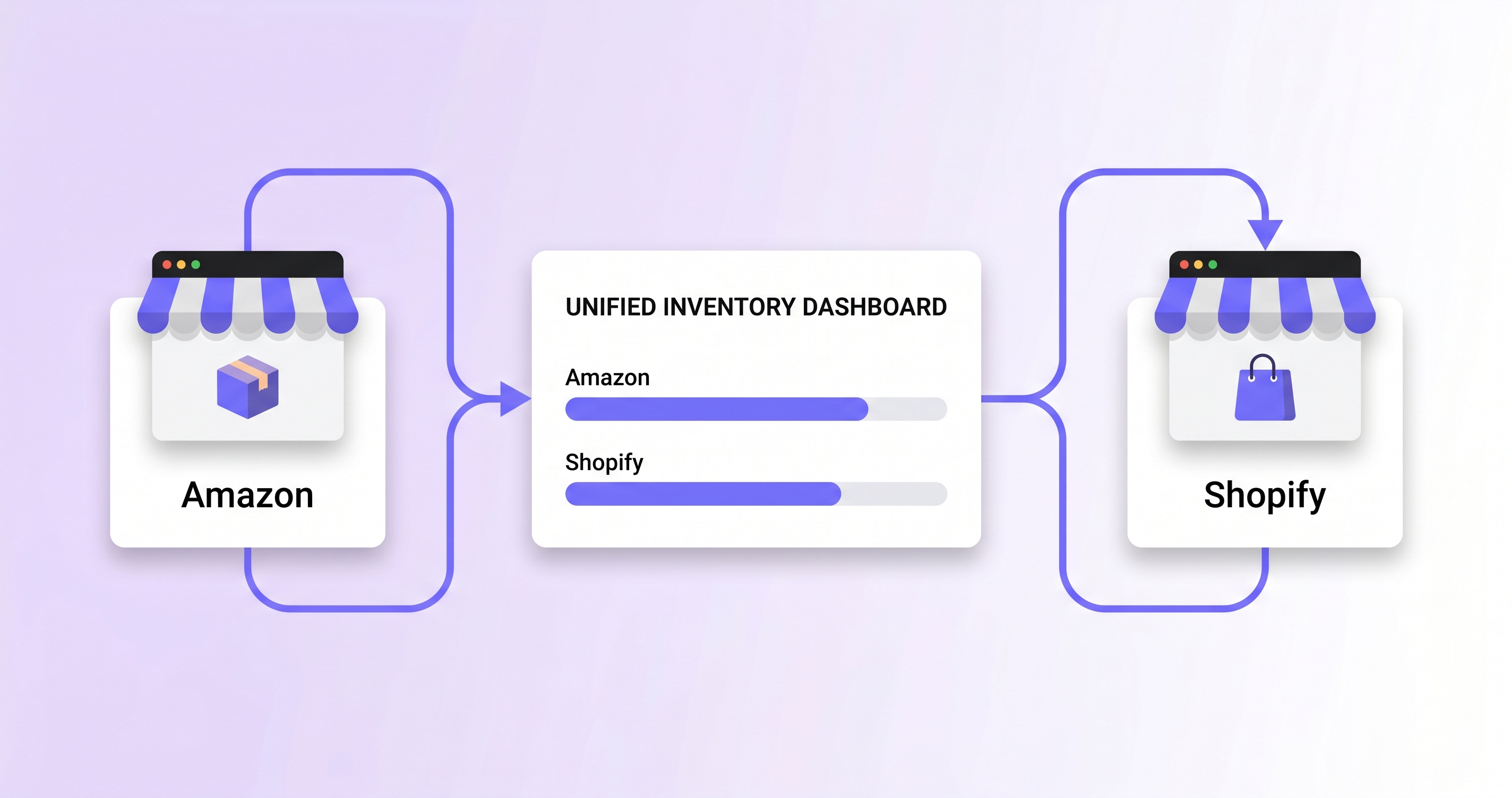
When businesses integrate Shopify with Amazon through a third-party platform, the tool connects to both via API. It reads inventory, order, and product data from each system and maintains a synchronized view across both.
At a high level, the process involves:
- Connecting each platform via API credentials
- Mapping products across channels (matching the same physical product on Amazon and Shopify, even if listings differ)
- Syncing stock levels so that a sale on one channel is reflected in the unified inventory view
- Managing orders from both channels in one place
One important nuance: Amazon and Shopify may list the same physical product with different SKUs, barcodes, or product identifiers. A good integration layer handles this matching explicitly, so the business can still manage and report on inventory as a single item while retaining the ability to break it down by sales channel when needed.
How to Connect Shopify to Amazon
The general steps for how to link Shopify with Amazon via a third-party platform are:
- Connect your Amazon Seller Central account — Provide API access so the integration tool can read your Amazon inventory, orders, and product data.
- Connect your Shopify store — Authenticate your Shopify account via API or app install.
- Map your products — Match Amazon ASINs or SKUs to the corresponding Shopify product listings. This product catalog synchronization step is critical — inaccurate mapping leads to incorrect stock updates.
- Configure inventory sync rules — Set how stock levels should be updated: in real time, on a schedule, or triggered by specific order events.
- Test before going live — Place test orders on both channels and verify that inventory counts update correctly across the board.
How to link Amazon to Shopify follows the same process in reverse — both connections are typically established simultaneously within the integration platform.
Syncing Inventory Between Amazon and Shopify
Once the integration is configured, inventory sync between platforms means that stock movements on either channel are reflected in your unified inventory view. A sale on Amazon reduces the available quantity you can sell on Shopify, and vice versa.
Effective ecommerce inventory automation at this stage provides several practical benefits:
- Prevention of overselling across channels
- Accurate available-to-sell quantities at all times
- Reduced manual inventory updates
- A single source of truth for stock levels across the business
Multi-channel inventory management works best when the integration handles edge cases cleanly — particularly around returns, cancellations, and partial fulfillments.
What Inventory Data Should Be Synced Between Amazon and Shopify?
When you sync Amazon and Shopify inventory, the integration should account for more than the basic available stock number. Orders, returns, cancellations, and reserved units can all affect how much inventory is actually available to sell.
A reliable Amazon Shopify inventory sync should keep the following data aligned:
| Inventory data | What should happen during sync | Why it matters |
|---|---|---|
| Available inventory | Update the sellable quantity on both channels | Prevents overselling |
| Amazon FBA inventory | Include eligible FBA stock in the available quantity | Keeps Shopify availability accurate |
| Shopify orders | Reduce the shared inventory pool after a sale | Prevents duplicate allocation |
| Amazon orders | Reduce available stock on Shopify | Keeps both channels aligned |
| Returns and cancellations | Restore inventory when units become available again | Prevents incorrect stock levels |
| Reserved or unavailable units | Exclude units that cannot currently be sold | Shows realistic available-to-sell stock |
The exact rules depend on how the business uses Amazon FBA, Shopify fulfillment, and other sales channels. The important point is that both platforms should work from the same inventory logic rather than maintaining unrelated stock counts.
Shopify Fulfillment by Amazon (FBA) Integration
A common scenario for multi-channel sellers is using Amazon's fulfillment infrastructure to fulfill Shopify orders. This is known as Shopify Fulfillment by Amazon — sometimes referred to as Shopify Amazon fulfillment or Multi-Channel Fulfillment (MCF).
In this setup, a customer places an order on Shopify, and Amazon's fulfillment network picks, packs, and ships the item. The inventory physically lives in Amazon's warehouses and is used to fulfill both Amazon marketplace orders and Shopify orders.
This creates a specific challenge: the same unit of inventory is being drawn from the same physical pool for two different channels. Without careful handling, this can lead to double-counting sales or reporting the same stock twice.
NeonPanel automatically matches Shopify orders fulfilled via Amazon FBA and ensures they are counted once — not separately on each channel — so inventory and sales reporting remain accurate across both platforms. Learn more about NeonPanel's Amazon logistics features.
Tools for Amazon Shopify Integration
There are several categories of tools that support Amazon Shopify integration and order and inventory integration across channels:
- Dedicated sync tools — Lightweight apps focused specifically on keeping stock levels aligned between Amazon and Shopify. Good for simple setups with straightforward product catalogs.
- Multi-channel inventory platforms — More comprehensive tools that connect inventory, orders, and financials across multiple sales channels and warehouses. Better suited for businesses managing significant volume or complexity.
- ERP and operations platforms — Enterprise-grade systems that handle inventory as part of a broader operational and financial stack.
When evaluating tools, the key capabilities to look for are: accurate SKU matching across channels, handling of FBA fulfillment scenarios, real-time or near-real-time stock updates, and clear reporting by channel. Platforms like NeonPanel connect natively to both Amazon and Shopify, unify inventory across channels, and handle cross-channel SKU matching — so businesses can view stock as a single pool while still disaggregating by sales channel in analytics when needed. You can see how this works in practice on NeonPanel's inventory management page.
How to Fix Amazon and Shopify Inventory Sync Issues
Even when an Amazon Shopify integration is configured correctly, inventory discrepancies can occur because of incorrect SKU mapping, delayed updates, or differences between available and reserved stock.
Before changing the integration settings, check the following:
- Verify SKU mapping — confirm that the Amazon ASIN or SKU is linked to the correct Shopify product and variant.
- Check inventory quantities — compare the available stock in both systems rather than comparing total inventory with available inventory.
- Review sync frequency — determine whether inventory updates are real-time, scheduled, or triggered by orders.
- Check fulfilment locations — make sure stock stored in Amazon FBA or other warehouses is assigned correctly.
- Review recent orders and returns — pending, cancelled, or returned orders can temporarily create differences between platforms.
- Test a stock update — change the quantity for a test product and confirm that the update reaches the other channel.
If discrepancies continue, the integration should be checked for failed API requests, mapping errors, or incorrect inventory rules. Fixing the underlying synchronization logic is preferable to manually adjusting stock on individual platforms.
Conclusion
Amazon and Shopify are two of the most widely used sales channels in ecommerce, but they don't communicate with each other out of the box. Syncing inventory between them requires a deliberate setup: connecting both platforms via API, mapping products accurately, and configuring sync rules that reflect how the business actually operates — including edge cases like FBA fulfillment of Shopify orders.
Done well, Amazon and Shopify inventory synchronization reduces manual work, prevents overselling, and gives operations teams a reliable view of stock across channels. The right tool makes this largely automatic, so the focus stays on selling rather than reconciling.