Learn how to sync Amazon and Shopify inventory without overselling FBA reserved units. An Amazon...

In this article
Amazon gives you plenty of inventory data, but it is spread across a dozen screens and downloads. One report shows what is in stock today, another explains how you got there, and a third warns you about storage fees. Pull the wrong Amazon inventory report and you end up with numbers that never match.
This guide covers which report answers which question, how to read the Inventory Ledger, how to reconcile your counts and what to do with the results at month end.
Which Amazon FBA Inventory Report to Use
Every Amazon FBA inventory report answers one question well and others poorly. The split that matters most is time. Some reports are live snapshots of today, while others rebuild what happened over a past period. Manage FBA Inventory tells you what is available right now, but it cannot tell you what you held on March 31.
Match your question to the report:
| Your question | Report | How often to check |
|---|---|---|
| What can I sell right now? | Manage FBA Inventory | Daily |
| How did stock change over a period? | Inventory Ledger | Monthly and whenever counts don't match |
| Which units are getting close to aged-inventory fees? | Inventory Age | Weekly |
| What should I reorder and when? | Restock Inventory | Weekly |
| Which SKUs come back most often? | FBA Customer Returns | Monthly |
| What did Amazon pay for lost or damaged units? | Reimbursements | Monthly |
| Where are my removal orders? | Removal Order Detail | After each removal |
| Which units have no active listing? | Stranded Inventory | Weekly |
Most of these reports download as CSV files. Once your catalog grows past a few dozen SKUs, sorting an export in a spreadsheet is faster than clicking through the dashboard. Saving those files also matters for inventory tracking over time, because the live screens in Seller Central overwrite yesterday's numbers.
What the Amazon Inventory Ledger Report Shows
The Amazon inventory ledger report works like a bank statement for your stock. It opens with a starting balance, lists every movement in and out of Amazon's warehouses and closes with an ending balance. Amazon introduced it in 2022 to replace several separate reports, so data you once collected from different files now sits in one place.
Summary view and detailed view
The summary view groups movements by FNSKU and disposition for a day, a week or a month. Each row is one product, and the columns show how its balance changed:
- starting balance;
- receipts;
- customer shipments and customer returns;
- vendor returns (removals);
- transfers between warehouses;
- found, lost, damaged and disposed units;
- ending balance.
You can look at a single fulfillment center or the whole country.
The detailed view lists each event on its own line: date, FNSKU, event type, quantity, fulfillment center, disposition and, for adjustments, a reason code. Use the summary to spot which SKU is off. Then switch to the detailed view to find out why.
Event types and inventory dispositions
Event types tell you what happened to a unit: it was received, shipped to a customer, returned, moved between warehouses, removed or adjusted. Dispositions describe its condition. Only sellable units can ship to buyers, while customer damaged, warehouse damaged, defective and expired stock stays in your balance without earning anything.
Inventory adjustments often come in pairs. When a returned unit turns out to be defective, the ledger shows one line that reduces sellable stock and another that adds the same quantity to defective. Read the two together, or you will count a loss that never happened.
Grouping adjustment lines by reason code is where inventory analytics gets practical, since a code that repeats across many SKUs points to a packaging, labeling or carrier problem.
How to Download the Amazon Seller Central Inventory Report
To get the Inventory Ledger in Seller Central:
- Go to Reports, then Fulfillment.
- Open Inventory Ledger in the Inventory section.
- Choose the summary or detailed view and set the date range.
- Filter by MSKU, FNSKU or ASIN if you only need one product.
- Generate the report and download the CSV, or view it online for a quick look at a few adjustments.
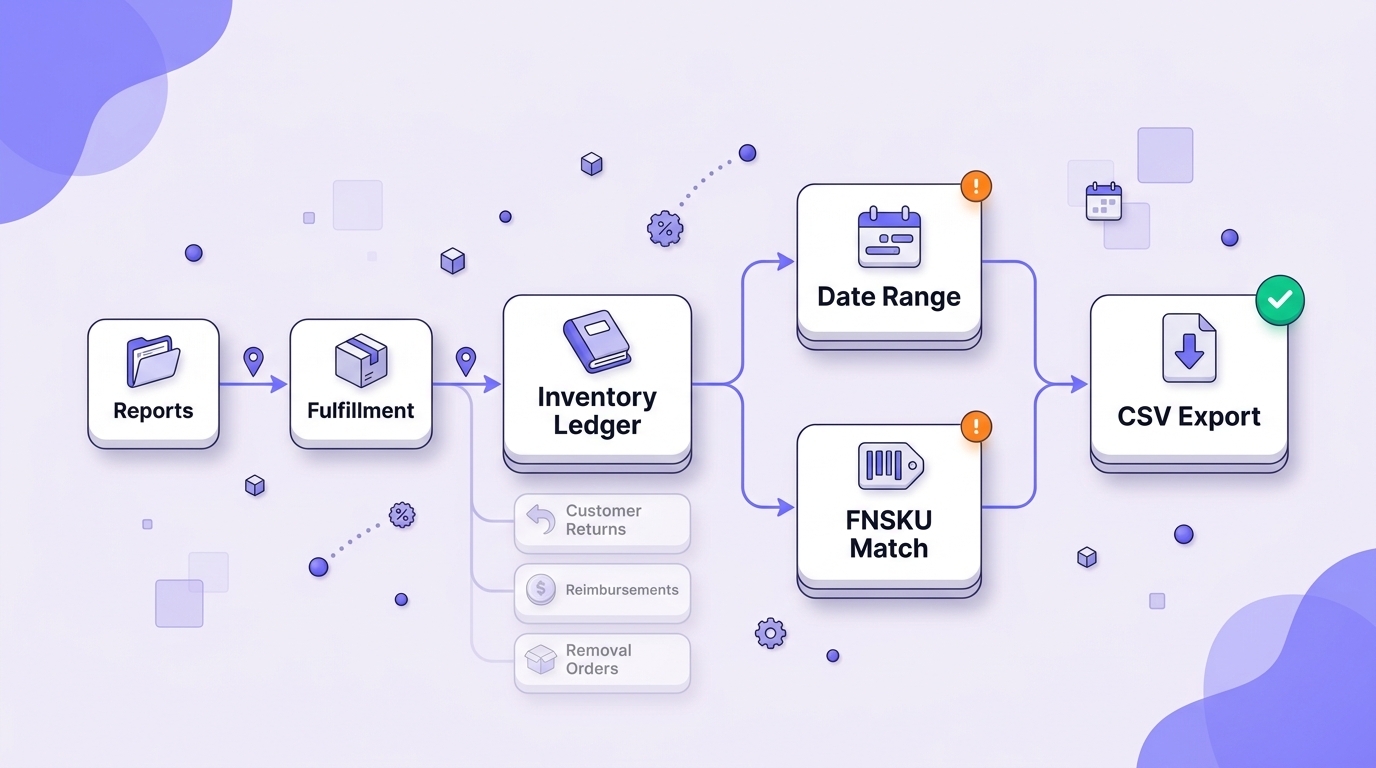
Two settings cause most of the confusion with an Amazon Seller Central inventory report. The first is the date range: an event at the end of one month can land in the next, so widen the range by a few days if the numbers look off. The second is the product identifier. Match rows by FNSKU, because it is the one field every fulfillment report shares.
The same menu holds every other Amazon FBA inventory report from the table above, including Customer Returns, Reimbursements and Removal Order Detail.
How to Reconcile an Amazon Inventory Report
Inventory reconciliation checks that what Amazon says you have matches what should be there. With the Amazon Seller Central inventory ledger report open, it comes down to five steps:
- Take the starting balance for the period from the summary view.
- Add receipts and customer returns.
- Subtract customer shipments and removal orders.
- Apply adjustments: found units add to the balance, while lost, damaged and disposed units reduce it.
- Compare the result with the ledger's ending balance and with on-hand units in Manage FBA Inventory.
Here is one SKU over a month. You start with 120 units, receive 500, get 15 back from customers, ship 410, remove 20 and lose 6. That leaves 120 + 500 + 15 − 410 − 20 − 6 = 199 units. If Manage FBA Inventory shows 195, four units are unaccounted for, and the detailed view for that FNSKU should explain where they went: a transfer between warehouses, a unit under research or an event dated after your range.
Run this check for your best sellers every month and for the full catalog at quarter end. Unit counts are only half the picture, though. Doing Amazon reconciliation alongside settlement payouts catches cases where a unit left the ledger but the matching refund or fee never showed up.
Which Discrepancies Qualify for Reimbursement
Units lost or damaged inside a fulfillment center are Amazon's responsibility. In the Amazon inventory ledger report, look for adjustments with misplaced and warehouse-damaged reason codes. Amazon first marks these units as Researching and looks for them for up to 30 days. If a unit turns up, a found adjustment cancels the loss; if it doesn't, Amazon reimburses you in cash or with a replacement unit.
Not every gap qualifies. These cases fall outside the policy:
- units damaged by the customer;
- expired stock;
- items disposed of at your request.
Refunded orders deserve a separate look: if the buyer got the money back but no customer return appears in the ledger, that order may also be eligible.
Once a month, compare the Reimbursements report with lost and damaged lines that have no matching reconciliation. Amazon updates its reimbursement policy and claim windows from time to time, so check the current terms in Seller Central before you open a case.
How an Amazon Business Inventory Report Feeds Your Books
The ledger counts units, but your accountant needs dollars. A month-end Amazon business inventory report for bookkeeping usually rests on three numbers: the value of ending inventory, purchases made during the period and cost of goods sold.
Ending value is the units left multiplied by their cost. That cost covers more than the supplier price, because freight, duties, prep and inbound placement fees belong in it too. When two batches arrived at different landed costs, the units still on hand carry the cost of their own batch. Units in damaged or defective dispositions may also need a write-down, since they are unlikely to sell at full price.
COGS follows the standard formula: beginning inventory plus purchases minus ending inventory. Done by hand, that means joining the ledger with purchase orders and freight invoices every month. An automated COGS calculation ties each sold unit to its batch cost, so your margin reports and balance sheet work from the same figures.