
In this article What Does COGS Mean What Is COGS in Business What Is Included in COGS COGS Formula...
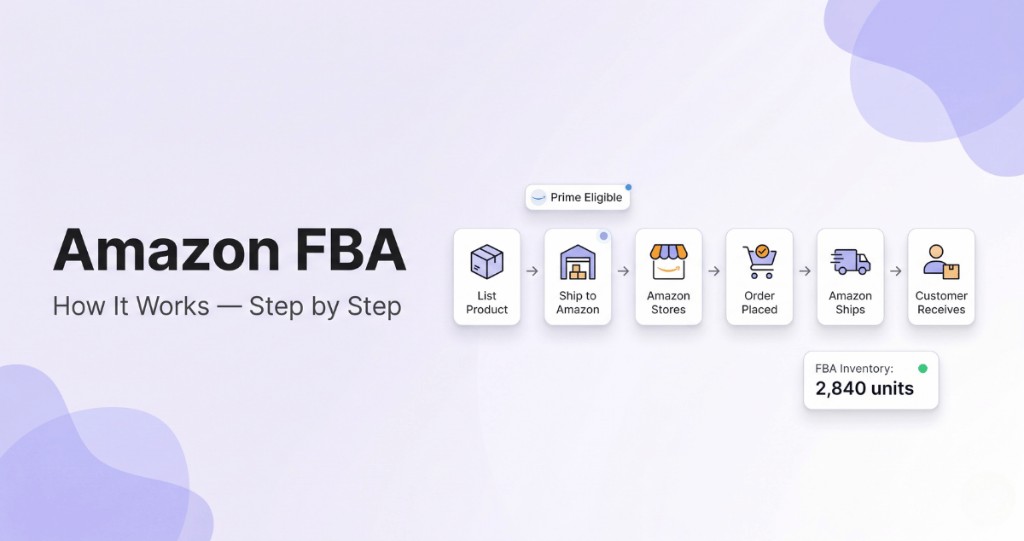
Fulfillment by Amazon (FBA) is the logistics model that lets sellers store inventory inside Amazon's warehouse network and outsource picking, packing, shipping, and returns to Amazon. It is one of the most widely adopted infrastructure choices in e-commerce — and one of the most misunderstood in terms of what it handles versus what the seller still owns.
In this article
- How Amazon FBA Works: Step by Step
- What Amazon FBA Covers — and What It Doesn't
- Who Can Become an FBA Seller on Amazon
- FBA vs FBM: Which Fulfillment Model Fits Your Business
- What Is Amazon FBA Automation
- Benefits of Amazon FBA
- What Are the Downsides of Amazon FBA
- Amazon FBA Fees Explained
- FBA vs AWD — Amazon Warehousing & Distribution
- How Much Inventory to Keep in FBA
- Is Amazon FBA Profitable in 2026
- FAQ
For operators scaling past self-fulfillment, what Amazon FBA means in practice is outsourced storage, picking, packing, and shipping, with automation keeping inbound, inventory, and settlements aligned with true unit economics.
This article covers the foundational questions: what FBA is, how it works step by step, what the cost structure looks like, and how automation fits into the model. For a deeper operational breakdown — inbound workflows, shipment prep, labeling compliance — see the companion guide: Amazon FBA Process Guide.
How Amazon FBA Works: Step by Step
Fulfillment by Amazon (FBA) is a service where Amazon stores your products, ships orders to customers, and handles post-purchase support on your behalf. Understanding how the system works end to end is the starting point for anyone building or evaluating an FBA business.
Step 1 — Create an Amazon Seller Account
Everything begins inside Amazon Seller Central. You choose between an Individual or Professional plan, submit business details, verify identity, and set up payment information.
An FBA seller is a third-party merchant who uses Amazon's fulfillment centers to store and ship products instead of handling logistics independently. The seller owns the inventory and brand; Amazon manages operations after the product reaches its warehouse. This model reduces operational complexity and allows sellers to focus on sourcing, marketing, and growth.
Step 2 — List Products
After registering, you create product listings. You can add a product to an existing listing (common in wholesale or arbitrage) or create a new listing under your own brand (the private label model).
This stage involves optimizing titles, bullet points, descriptions, keywords, and images. Even though logistics are outsourced, listing quality and brand positioning remain fully in the seller's control. FBA is a logistics solution within a broader e-commerce strategy — branding, pricing, and product differentiation are the seller's responsibility.
The listing stage looks different depending on which selling model you operate. Private label sellers create a new listing under their own brand and control titles, images, pricing, and positioning entirely. Wholesale sellers add their offer to an existing brand's listing and compete on price and Buy Box share. Arbitrage sellers source discounted products from retail or online stores and resell them on existing listings without brand involvement. FBA works the same way across all three models.
Step 3 — Send Inventory to Amazon Warehouses
Once listings are ready, you create a shipping plan that tells Amazon what products you are sending, how many units, and the packaging type (individual units or case-packed). Inventory ships to designated fulfillment centers. Depending on your region, products may be distributed across multiple warehouses to ensure faster Prime delivery.
Labeling requirements must be followed precisely. Each unit needs a scannable barcode — either the manufacturer barcode or Amazon's FNSKU. For a detailed walk-through of inbound prep requirements, see FBA Shipping: Key Steps and Mistakes to Avoid.
Since January 1, 2026, Amazon no longer preps or labels units for FBA shipments in the US. The change applies to all inventory entering the US fulfillment network, including stock that moves through AWD and Amazon Global Logistics. Polybagging, bubble wrap, and FNSKU labels are now your job: you can handle them in-house, ask the manufacturer to do it before dispatch, or hire a third-party prep center. Amazon can refuse units that arrive without the required prep, and you pay to fix them.
Step 4 — Amazon Stores and Tracks Inventory
After inventory arrives, Amazon scans, registers, and stores it in their warehouse network. From here, inventory management becomes semi-automated. The system tracks available stock, reserved units, inbound shipments, and sell-through rate.
This centralized infrastructure makes FBA scalable. You do not need your own warehouse or logistics staff — instead, you monitor stock levels digitally and restock when necessary. Tracking FBA inventory positions accurately becomes increasingly important as SKU count and channel complexity grow.
Step 5 — Amazon Picks, Packs, and Ships Orders
When a customer places an order, Amazon handles the entire fulfillment process: picking the item from storage, packing it securely, shipping it under Prime eligibility (if qualified), and providing tracking updates. From the customer's perspective, the purchase feels like buying directly from Amazon — which improves trust and conversion rates.
Step 6 — Returns and Customer Service Handling
Returns are an inevitable part of e-commerce. With FBA, Amazon processes customer return requests, issues refunds, and evaluates returned items for resale or disposal. Customer messages related to shipping or delivery are handled by Amazon's support team — significantly reducing operational workload, especially at volume.
Amazon puts a returned unit back into sellable stock if it passes inspection. Unsellable units stay in your account until you create a removal order to get them back or have Amazon dispose of them, and you can set removals to run automatically. For orders where Amazon offers the customer free return shipping, you also pay a returns processing fee. Amazon advises sellers to monitor their accounts for return-related charges and reimbursements: a refund issued to the customer does not guarantee that the unit made it back to your inventory.
Step 7 — Amazon Pays Out Your Earnings
Amazon collects the payment for every order, keeps its referral fee, the FBA fulfillment fee, and any storage or service charges, and pays you the balance. Payouts run on a settlement cycle of about two weeks. Money from a single order also stays on hold until roughly seven days after delivery, so cash from today's sales reaches your bank account well after the order date.
Every payout comes with a settlement report listing sales, refunds, fees, reimbursements, and adjustments line by line. In an Amazon FBA business, the payout total says little about profit until you match each fee and refund to its SKU and subtract the cost of goods sold. NeonPanel's automated data entry ingests every Amazon settlement, reconciles each fee, refund, and adjustment, and posts the result to QuickBooks or Xero.
What Amazon FBA Covers — and What It Doesn't
One of the most common misconceptions about the meaning of FBA in Amazon selling is that Amazon runs the entire business. In reality, FBA is fulfillment infrastructure — not a business operator. Understanding where Amazon's responsibility ends and the seller's begins is essential for realistic planning.
| Area | Handled by Amazon (FBA) | Handled by Seller |
|---|---|---|
| Warehousing | Yes | — |
| Picking & Packing | Yes | — |
| Shipping to Customer | Yes | — |
| Returns Processing | Yes | — |
| Product Research | — | Yes |
| Supplier Negotiation | — | Yes |
| Listing Optimization | — | Yes |
| Advertising Strategy | — | Yes |
| Brand Development | — | Yes |
Amazon FBA eliminates logistical complexity — storage, packaging, shipping, and return handling — at scale. That infrastructure is what makes global selling viable for small and mid-sized businesses. But the strategic work: sourcing decisions, margin management, advertising, and brand building remains entirely the seller's domain.
Who Can Become an FBA Seller on Amazon
Any Amazon selling account can use FBA, on either the Individual or the Professional plan. In Seller Central you register for FBA under Account Info, then assign listings to the program: a single product or your whole catalog.
| Individual plan | Professional plan | |
|---|---|---|
| Monthly fee | None | $39.99 |
| Fee per item sold | $0.99 | None |
| Better fit | Under 40 sales a month | 40 or more sales a month |
Sellers on both plans also pay referral fees and FBA fees.
The stricter rules apply to products. Amazon accepts the majority of items into FBA but excludes alcoholic beverages and tires, and dangerous goods usually cannot ship through FBA. Products with an expiration date have to meet shelf-life requirements, and some categories require Amazon's approval before you can list them at all. Check the FBA product restrictions for your category before you place a purchase order: an item FBA won't accept can still sell through FBM, while a gated category stays closed until Amazon approves you.
FBA vs FBM: Which Fulfillment Model Fits Your Business
FBM (Fulfilled by Merchant) is the alternative to FBA. With FBM, the seller stores inventory independently, manages packaging, ships orders directly to customers, and handles all post-purchase support. Amazon provides the marketplace; the seller provides the logistics.
The choice between FBA and FBM is not binary for most sellers. Many operate a hybrid model — using FBA for fast-moving, high-volume SKUs and FBM for oversized, low-velocity, or custom products where FBA fees would compress margins below viability.
| Feature | FBA | FBM |
|---|---|---|
| Fulfillment | Amazon | Seller |
| Prime eligibility | Automatic | Seller Fulfilled Prime (conditional) |
| Storage | Amazon warehouses | Seller's own facility |
| Returns handling | Amazon | Seller |
| Fee structure | Fulfillment + storage fees | No FBA fees; seller absorbs shipping costs |
| Best for | Scalable, standardized products | Oversized, custom, or low-volume SKUs |
Prime eligibility under FBM is possible through Seller Fulfilled Prime (SFP), but it requires meeting strict performance metrics: on-time delivery of at least 93.5%, valid tracking of at least 99%, a cancellation rate below 0.5%, and weekend shipping.
For most sellers entering Amazon, FBA removes the operational barriers that make self-fulfillment unsustainable at scale. The decision to stay with FBM or transition to FBA typically comes down to margin math: whether fulfillment fee savings outweigh the Prime conversion uplift and operational relief FBA provides.
What Is Amazon FBA Automation
Many sellers look to reduce manual involvement as their FBA business scales. Amazon FBA automation refers to the use of software, systems, or third-party service providers to streamline or fully manage parts of the selling process.
Automation commonly applies to:
- Inventory forecasting and reorder triggers
- Repricing tools
- PPC campaign optimization
- Accounting integration and COGS tracking
- Multi-channel order syncing
Some sellers go further and invest in an Amazon automation business, paying a service provider to build and run an Amazon store for them. In such an automation store, the provider handles sourcing, listing, fulfillment coordination, and advertising.
How Does Amazon Automation Work
There are two distinct paths:
- Software-based automation: Tools optimize pricing, ads, and inventory automatically using real-time data from your account.
- Agency-based automation: A company runs the store for you in exchange for setup fees and a revenue share arrangement.
NeonPanel runs this layer through AI agents for replenishment, forecasting, and accounting that work on your Amazon data inside Claude, Slack, or any MCP client.
Fully hands-off models often require significant upfront capital and carry real execution risk. Automation reduces labor — it does not eliminate business risk.
Risks of done-for-you automation agencies
Setup fees typically range from $20,000 to $50,000, with ongoing profit-sharing arrangements on top. Many agencies use sourcing or fulfillment methods that violate Amazon's Terms of Service. When violations occur, the account owner faces suspension and loss of funds — not the agency.
A legitimate automation partner will never guarantee returns, will operate exclusively under your legal entity, and will provide transparent reporting on all account activity. Before signing any agreement, verify the agency's track record independently and review the contract for account ownership clauses.
Benefits of Amazon FBA
FBA remains attractive because it removes operational barriers that typically limit small and mid-sized e-commerce businesses. Here is what each benefit translates to in practice.
| Benefit | What It Means in Practice | Business Impact |
|---|---|---|
| Logistics Infrastructure | Access to Amazon's global warehouse and delivery network | No need to rent warehouse space or hire fulfillment staff |
| Prime Eligibility | Products qualify for fast Prime shipping | Higher conversion rates and customer trust |
| Scalability | Easy expansion across regions and marketplaces | Faster growth without physical expansion |
| Operational Relief | Amazon handles storage, packing, shipping, and returns | Reduced daily workload and fewer logistics errors |
| Customer Service | Amazon manages delivery-related support | Improved customer experience consistency |
| Multi-Channel Fulfillment | Ability to fulfill non-Amazon orders using FBA stock | Centralized inventory management across channels |
Prime eligibility affects more than conversion rates. Amazon's search algorithm factors in fulfillment method when ranking listings. FBA products with Prime status consistently rank higher for competitive keywords than equivalent FBM listings, because Amazon prioritizes offers it can fulfill reliably and quickly. For sellers in high-competition categories, the ranking uplift from Prime eligibility is often as significant as the conversion rate improvement it drives at the listing level.
Multi-Channel Fulfillment puts the same stock to work for orders from your own website and other marketplaces. You pass the order to Amazon, and Amazon picks, packs, and ships it from your FBA inventory, so one pool of stock serves every channel. MCF has its own fees, separate from standard FBA fulfillment fees.
What Are the Downsides of Amazon FBA
FBA hands logistics to Amazon, and in exchange you give up some control and accept fees that grow while inventory sits. The trade-offs weigh heaviest on slow-moving, bulky, and low-margin SKUs.
| Downside | What It Means for You |
|---|---|
| Fees on slow stock | Monthly storage keeps running, and units stored 181 days or longer also carry an aged inventory surcharge |
| Prep compliance | A prep or labeling mistake can keep Amazon from receiving your units |
| Capacity limits | Amazon caps how much inventory you can send, and going over your restock limit can raise storage costs |
| Amazon packaging | Orders arrive in Amazon-branded boxes with no room for your own unboxing |
| More returns | Amazon's easy return policy leads to more returns, and you cover processing fees and unsellable units |
Amazon FBA Fees Explained
While FBA simplifies operations, it comes with a layered cost structure. Understanding each fee type is essential for accurate margin calculations before committing to a product or SKU.
- Fulfillment Fees — Charged per unit for picking, packing, and shipping. Based on product size tier and weight.
- Storage Fees — Monthly charges per cubic foot of warehouse space used. Rates increase during Q4 peak season.
- Long-Term Storage Fees — Applied to inventory stored longer than 181 or 365 days.
- Referral Fees — A percentage of each sale paid to Amazon for marketplace access. Rates vary by category.
- Optional Fees — Removal fees, labeling services, advertising spend, and multi-channel fulfillment surcharges.
Many new sellers underestimate fees, leading to margin compression. A sustainable FBA business typically targets 30–40% gross margin before advertising and 15–25% net margin after, depending on niche and product category.
For a complete breakdown of how to calculate true unit economics — including COGS, landed costs, and FBA fees — see Amazon COGS Formula: A Practical Guide.
Accurate cost tracking is not optional at scale. Small fee inefficiencies compound quickly across high-volume SKUs. NeonPanel's true FIFO COGS engine calculates per-unit profit down to the batch level — not averaged estimates that mask real margin variance.
FBA vs AWD — Amazon Warehousing & Distribution
As Amazon periodically tightens FBA capacity allocations — particularly during Q4 peak — many sellers are turning to AWD (Amazon Warehousing & Distribution) as a complementary storage and replenishment layer.
AWD is Amazon's bulk upstream storage program. Sellers ship large quantities of inventory to AWD facilities at lower per-cubic-foot storage costs. Amazon then automatically replenishes FBA stock as inventory depletes, without the seller creating a new inbound shipment each restock cycle.
The core distinction: FBA is the customer-facing fulfillment layer — pick, pack, ship. AWD is the upstream buffer — bulk storage with automated flow into FBA.
Why the FBA + AWD combination has become the standard logistics strategy for high-volume sellers in 2026:
- AWD storage costs are lower per cubic foot than standard FBA storage, reducing holding costs for slower-turn inventory
- AWD capacity restrictions are typically more lenient than FBA IPI-based limits, making it valuable when FBA space becomes constrained during peak periods
- Auto-replenishment from AWD removes the need to manually plan every FBA inbound shipment, creating a more consistent restock cadence
- Transfer time from AWD to FBA is 1–5 days — manageable for most SKU velocity profiles when factored into planning lead times
Not all products qualify for AWD, and the program carries its own fee structure including transfer fees and handling charges. The right balance between FBA and AWD depends on SKU velocity, seasonality, and cash flow cycle.
| FBA | AWD | |
|---|---|---|
| Role | Pick, pack, ship to customer | Bulk storage + auto-replenishment |
| Storage cost | Higher (especially Q4) | Lower per cubic foot |
| Transfer time | Immediate | 1–5 days to FBA |
| Capacity limits | Subject to IPI restrictions | Separate limits, typically looser |
| Best for | Active, fast-moving SKUs | Buffer stock, seasonal prep |
NeonPanel tracks both FBA and AWD inventory positions, inbound shipments, and restock movements in a unified view — giving sellers visibility across both layers without switching between reports. Learn more about automated FBA logistics and automating FBA and AWD inbounds.
How Much Inventory to Keep in FBA
Amazon recommends keeping about two months of inventory in its fulfillment centers and starting a new product with a small batch to test demand. Treat two months as a baseline. The right level for each SKU depends on its sales velocity and on how long a restock takes to reach Amazon.
Both extremes cost money. Excess stock pays monthly storage, and units held 181 days or longer add an aged inventory surcharge on top. Too little stock takes the listing out of stock, sales stop, and organic rank can slip before the next shipment checks in.
A reorder point has to cover the full lead time, from supplier production through freight and FBA check-in. With sea freight, that cycle often runs 8 to 12 weeks, so you place the next purchase order while current stock still looks healthy. Seller Central covers basic Amazon automation for restocking: the Restock Inventory tool suggests quantities and ship dates based on sales history, forecast demand, and seasonality, and replenishment alerts flag SKUs running low.
NeonPanel takes Amazon FBA automation further on the inventory side. Its inventory planning module builds an ASIN-level demand forecast from at least 12 months of your Amazon sales history and factors supplier lead times, transit, and FBA check-in into each reorder point. You get an alert when a SKU approaches its reorder threshold.
Is Amazon FBA Profitable in 2026
The profitability of Amazon FBA in 2026 depends far more on strategy than on the model itself. The infrastructure still works. Customer demand is still strong. Amazon's logistics network remains one of the most capable in global e-commerce.
The marketplace has matured considerably, however. It is no longer forgiving to poorly researched products or weak financial planning. Sellers who treat FBA as a real business — with proper cost accounting, supply chain control, and margin discipline — still generate consistent, defensible returns.
In 2026, opportunity continues to exist for:
- Private label brands with genuine product differentiation
- Products that solve clear, measurable problems at a defensible price point
- Sellers with supply chain control and reliable landed cost data
- Businesses using data-driven advertising strategies with accurate ROAS visibility
Starting with limited capital is viable, but requires tighter product selection. Arbitrage and wholesale models have lower entry costs than private label because they do not require product development or custom packaging. Many sellers begin with retail arbitrage to learn platform mechanics, then reinvest profits into wholesale or private label once unit economics are understood. The practical floor is roughly $500–$2,000 for arbitrage and $2,000–$5,000 for a first wholesale or private label order, factoring in inventory, inbound shipping, and initial advertising spend.
Profit is highly sensitive to cost structure. Small fee inefficiencies — fulfillment costs, referral fees, advertising spend — compound quickly across high-volume SKUs. Automation tools can reduce manual workload and improve data visibility, but they cannot compensate for poor product selection or unrealistic pricing assumptions.
Cash flow management is equally critical. Inventory ties up capital. Storage fees increase with age. Long-term storage penalties quietly reduce margins when sell-through is slow. Sustainable FBA businesses monitor turnover closely, plan restock cadences carefully, and avoid overstocking into expensive Q4 storage windows.
Margin discipline starts with knowing your true per-unit costs — not estimates. Accurate landed cost and FIFO COGS data gives you the financial visibility needed to make sourcing, pricing, and inventory decisions on fact rather than assumption. See also: supply chain logistics management and Amazon seller accounting.
Track FBA and AWD Inventory Across Your Entire Operation
NeonPanel gives you unified FBA + AWD inventory positions, automated COGS calculations, and accurate per-SKU profitability — all on one ledger that connects directly to QuickBooks or Xero.
Further reading: Complete Amazon FBA Process Guide · Amazon FBA Mistakes to Avoid · Automating FBA & AWD Inbounds
Frequently Asked Questions
Is Amazon FBA worth it?
For standard-size products with steady sales and margins that cover fulfillment, referral, and storage fees, yes. Bulky, slow-moving, or low-margin SKUs usually earn more on FBM. Check each product in Amazon's Revenue Calculator first.
Do I need to be an LLC to sell on Amazon FBA?
No. You can register as an individual with your personal ID, bank account, and tax details, and FBA works the same way.
How much does it cost to start an Amazon FBA business?
About $500 to $2,000 for retail arbitrage and $2,000 to $5,000 for a first wholesale or private label order, including inventory, inbound shipping, and initial ads. The Professional plan adds $39.99 a month.
Does FBA charge monthly fees?
Yes, storage. Amazon bills it monthly per cubic foot, with higher rates from October to December, plus an aged inventory surcharge on units stored 181 days or longer.
Why is my FBA fee so high?
The fee depends on size tier, shipping weight, and price. Check the dimensions Amazon has on file in the Fee Preview report: if they are larger than your own measurements, request a remeasurement.
What is an Amazon automation store?
A seller account that an agency runs for an owner who provides the capital, usually for a setup fee plus a profit share. The owner keeps the account's risks, including suspension if the agency breaks Amazon's rules.
Is Amazon automation a good investment?
Software tools for repricing, ads, forecasting, and accounting cost a predictable monthly fee. Done-for-you stores often cost $20,000 to $50,000 upfront plus a profit share, with no guaranteed returns.