
Let NeonPanel calculate COGS instead of maintaining it
The same plan as Automatic P&L, fed differently — capture purchase orders and the Bills that carry freight, duty, and prep, and NeonPanel derives landed unit cost so COGS moves when your costs move
Unified system
- Accounting
- Inventory
- Forecasting
- AI access

Trusted by 200+ Ecommerce Teams












Unit cost stops being a number you own
On Automatic P&L, COGS is only as current as the unit cost somebody typed in. That works until suppliers reprice, freight moves, or duty lands unevenly — and then margin quietly drifts away from reality.
There is nothing to buy to fix it. Capture the purchase order in NeonPanel and attach the Bills that came with it — factory invoice, freight, duty, prep. The cost engine allocates them across the units received, and the landed unit cost it produces is what COGS posts against. You maintain documents; NeonPanel maintains costs.
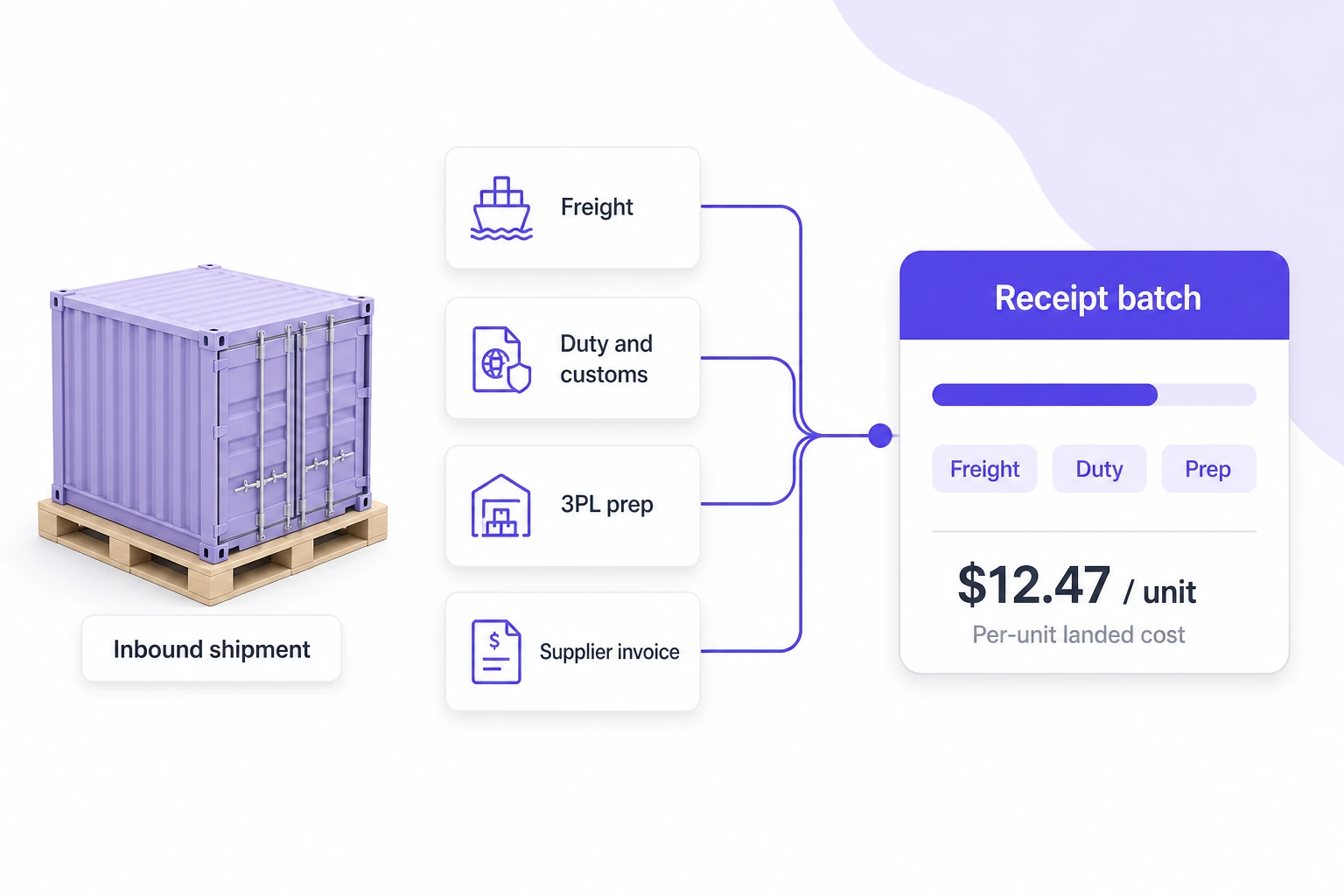
What capturing orders and Bills changes
Orders and Bills become the cost model
Capture the purchase order, then the Bills that ride with it — factory invoice, freight, duty, prep. NeonPanel allocates them across the units received and produces a landed unit cost you did not have to compute.
COGS that moves when costs move
When a freight invoice arrives late or a duty notice changes, the allocation replays and the affected periods recalculate. Margin history reflects what you actually paid, not what you assumed at the time.
Inventory and the books read one set of numbers
The cost engine feeds inventory valuation on one side and COGS on the other. Stock value and P&L stay a single conversation instead of two teams defending two spreadsheets.
See the Inventory Management module → · How COGS reaches the GL →
Costs here smooth at the PO ceiling
Essentials calculates as though stock sat in one place. Costs resolve to PO-level averages — honest, quick to activate, and clear about its own resolution. But two shipments against the same order that met very different freight rates end up sharing one blended figure, and units in transit or resting at a 3PL are not tracked as their own state.
Professional resolution models each shipment as a distinct object, so cost precision rises to the batch and calculated balances appear across the chain.
Modules in this combination
The same plan as Automatic P&L — no upgrade sits between them. What changes is whether you supply the unit cost or NeonPanel derives it from your documents.
- Accounting & Finance Included
- Inventory Management Essentials
- Forecasting & Replenishment Not included
- NeonPanel MCP Optional
- Agents in Slack Optional
Identical to Automatic P&L on paper — same plan, same modules. The difference is the input: purchase orders and Bills go in, and the cost engine works the unit cost out. Professional is the first real plan change, and you need it when one blended cost per order stops being precise enough.
Who runs this, and what they run it for
Operations managers
You already collect supplier invoices, freight bills, and duty notices. This turns that paperwork into costs instead of an archive.
Runs it forLanding a new supplier order — record the order, attach bills as they arrive, and watch landed unit cost resolve without a spreadsheet model.
Bookkeepers and accountants
You want COGS with a documented basis behind every unit, so month-end does not start with a cost investigation.
Runs it forLate freight invoices — a carrier bills three weeks after receipt, the allocation replays, and affected margins correct themselves.
Founders past the estimate stage
Catalog costs got you your first close. Volume and supplier churn have made keeping them current somebody's weekly job.
Runs it forMargin review by SKU — contribution on costs derived from documents, not from a rate somebody averaged last quarter.
Neon does the data entry from the document
This combination runs on documents, which is exactly what agents are good at. Hand Neon a supplier invoice or packing list and ask for an inventory order — lines, quantities, and costs come back as a draft in NeonPanel for you to confirm, so capturing an order stops meaning typing one.
Marta covers the other side, reconciling a Seller Central settlement PDF against what actually posted.
- What is the landed unit cost on my last order?
- Which orders are missing a freight bill?
- Show gross margin by SKU on calculated costs.
- Which SKUs lost margin after the last freight increase?
- Which bills have not been allocated yet?
- Summarize duty paid by supplier this quarter.
“We no longer rely on estimates for our COGS or pricing decisions.”
Anna Samsonova, COO · 5 Stars United · 85% reduction in COGS errors
Frequently asked questions
No. Both run on Essentials with the same modules. The only difference is what you feed in: a unit cost you supply, or purchase orders and Bills the cost engine derives one from. Nothing needs upgrading to move between them — see Automatic P&L.
Essentials resolves costs to PO-level averages, which is honest but blends shipments together. Professional models each shipment as its own object, raising cost precision to the batch and surfacing in-transit and 3PL balances. That one is a plan change — compare the two.
The allocation replays across the units the Bill belongs to and the affected periods recalculate, so historical margin corrects itself rather than staying wrong. Landed cost and batch economics covers the mechanics.
The module page documents everything Inventory Management does at both resolutions. This page is about one specific trade: the work of maintaining unit costs moving from your team to the cost engine, and what that still leaves imprecise.
Yes. Forecasting & Replenishment works with either inventory resolution — Essentials gives it a market-level stock position to plan against, Professional adds in-transit states and lane-level lead times. See Forecast and replenish.
Bring NeonPanel into your stack
14-day free trial. No credit card. Dedicated onboarding on every plan — we set up your batches, your ledger, and your channels with you.
Join 200+ ecommerce teams who trust NeonPanel for their financial close.